

Join our community of software engineering leaders and aspirational developers. Always
stay in-the-know by getting the most important news and exclusive content delivered
fresh to your inbox to learn more about at-scale software development.
RESUBSCRIPTION REQUIRED
It seems that you’ve previously unsubscribed from our newsletter
in the past. Click the button below to open the re-subscribe form
in a new tab. When you’re done, simply close that tab and continue
with this form to complete your subscription.
RE-SUBSCRIBE
The New Stack does not sell your information or share it with
unaffiliated third parties. By continuing, you agree to our
Terms of Use and
Privacy Policy.
Welcome and thank you for joining The New Stack community!
Please answer a few simple questions to help us deliver the news and resources you are interested in.
COUNTRY
REQUIRED
Great to meet you!
Tell us a bit about your job so we can cover the topics you find most relevant.
How many employees are in the organization you work with?
REQUIRED
Welcome!
We’re so glad you’re here. You can expect all the best TNS content to arrive
Monday through Friday to keep you on top of the news and at the top of your game.
What’s next?
Check your inbox for a confirmation email where you can adjust your preferences
and even join additional groups.
Follow TNS on your favorite social media networks.
Become a TNS follower on LinkedIn.
Check out the latest featured and trending stories while you wait for your
first TNS newsletter.
As a JavaScript developer, what non-React tools do you use most often?
✓
Angular
0%
✓
Astro
0%
✓
Svelte
0%
✓
Vue.js
0%
✓
Other
0%
✓
I only use React
0%
✓
I don’t use JavaScript
0%
2025-01-21 08:33:12
Avalonia: An Open Source Option for Cross-Platform UI Work
tutorial,
Developer tools
/
Frontend Development
Avalonia is an open source framework for cross-platform UI work. It’s commonly used for building apps in .NET that work across devices.
Jan 21st, 2025 8:33am by
David Eastman

Image via Unsplash+.
The problem with .NET has always been that Microsoft were somewhat slow to embrace non-Windows systems. To find a UI library that uses C# but runs on a MacBook is harder than it should be. One solution is Avalonia, which helps you “build apps for every device using .NET” — and it does indeed fill the open source cross-platform framework hole. Plus, looking at it will also hone your framework design skills.
Getting Started
So let’s get started with Avalonia by writing something simple, while having a look at the architecture. I’ll assume you have Visual Studio Code installed, as well as .NET. I’ve covered using VS Code in various earlier posts; its flexibility makes it ideal for dipping into different projects (Avalonia itself actually recommends using JetBrains’ .NET IDE, Rider).
We’ll use dotnet in the command line and that will speed up creating a simple project. Firstly, we install the Avalonia templates:

In a fresh project directory, we use the MVVM template, which also works on MacOS:

Then we’ll open up with Visual Studio Code in the folder as always:
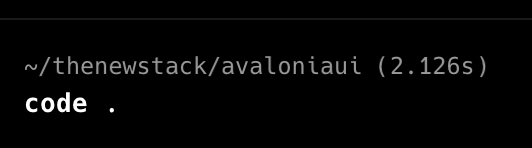
Search for the Avalonia extensions. You will certainly want the first one:

If we select the Program.cs file and click the arrow to “Run the program associated with this file” Avalonia will immediately build a window:

That’s fine. Now let’s take a look at the basics and then do something more interesting.
If you are familiar with Windows Presentation Foundation (or WPF, which I happily assume you know nothing about) then you will have seen Extensible Application Markup Language (XAML) and Avalonia uses its own branded “axaml” file extension. You’ll also note that it appends the C# extension to mark “code behind” files. This all works, even if it is a little messy. Yes, it’s XML folks.
Thankfully, there are a few interesting files. The window is defined in “MainWindow.axaml”, and you can see the Title defined:

The only other interesting thing is the TextBlock definition.
<TextBlock Text=”{Binding Greeting}” HorizontalAlignment=”Center” VerticalAlignment=”Center”/>
|
<TextBlock Text=”{Binding Greeting}” HorizontalAlignment=”Center” VerticalAlignment=”Center”/> |
Apart from positioning itself in the center of the screen, as we saw, it also introduces us to data binding, which is slightly trickier than perhaps it should be. Clearly, we are going to find that the term Greeting is bound to a variable, but where?
If we look into one of the boilerplate files “App.axaml.cs”, we see that there is a thing called DataContext, which gets set on startup:
…
desktop.MainWindow = new MainWindow {
DataContext = new MainWindowViewModel(),
};
…
|
… desktop.MainWindow = new MainWindow { DataContext = new MainWindowViewModel(), }; … |
This states that when the framework starts binding, it will use this new model class. And if we look in “MainWindowViewModel.cs”, we find roughly what we were expecting:
namespace avaloniaui.ViewModels;
public partial class MainWindowViewModel : ViewModelBase {
public string Greeting { get; } = “Welcome to Avalonia!”;
}
|
namespace avaloniaui.ViewModels; public partial class MainWindowViewModel : ViewModelBase { public string Greeting { get; } = “Welcome to Avalonia!”; } |
So, the TextBlock has been bound to the class variable. The IDE is mainly helpful in negotiating this after a build.
S,o let’s hit the hard stuff and look at a bit of UI. I’m going to build a list box that allows you to select a simple category item and fill another list with examples. So we’ll see a bit of UI design and deal with some events.
Going back into the MainWindow.axaml file, we replace the solitary TextBlock with this:
<StackPanel Orientation=”Horizontal”>
<TextBlock Text=”{Binding Greeting}” FontSize=”20″ FontWeight=”Bold” Margin=”20 10″/>
<StackPanel Margin=”20 25″>
<TextBlock Margin=”0 5″ Background=”LightBlue” DockPanel.Dock=”Top”>Choose a category</TextBlock>
<ListBox x:Name=”category” SelectionChanged=”CategoryChanged” Margin=”1″ SelectionMode=”Single,AlwaysSelected”>
<ListBox.ItemTemplate>
<DataTemplate>
<TextBlock Text=”{Binding}”/>
</DataTemplate>
</ListBox.ItemTemplate>
</ListBox>
</StackPanel>
<StackPanel Margin=”20 25″>
<TextBlock Margin=”0 5″ Background=”LightBlue” DockPanel.Dock=”Top”>Examples</TextBlock>
<ListBox x:Name=”resultlist”>
<ListBox.ItemTemplate>
<DataTemplate>
<TextBlock Text=”{Binding}”/>
</DataTemplate>
</ListBox.ItemTemplate>
</ListBox>
</StackPanel>
</StackPanel>
|
1 2 3 4 5 6 7 8 9 10 11 12 13 14 15 16 17 18 19 20 21 22 23 24 |
<StackPanel Orientation=”Horizontal”> <TextBlock Text=”{Binding Greeting}” FontSize=”20″ FontWeight=”Bold” Margin=”20 10″/> <StackPanel Margin=”20 25″> <TextBlock Margin=”0 5″ Background=”LightBlue” DockPanel.Dock=”Top”>Choose a category</TextBlock> <ListBox x:Name=”category” SelectionChanged=”CategoryChanged” Margin=”1″ SelectionMode=”Single,AlwaysSelected”> <ListBox.ItemTemplate> <DataTemplate> <TextBlock Text=”{Binding}”/> </DataTemplate> </ListBox.ItemTemplate> </ListBox> </StackPanel> <StackPanel Margin=”20 25″> <TextBlock Margin=”0 5″ Background=”LightBlue” DockPanel.Dock=”Top”>Examples</TextBlock> <ListBox x:Name=”resultlist”> <ListBox.ItemTemplate> <DataTemplate> <TextBlock Text=”{Binding}”/> </DataTemplate> </ListBox.ItemTemplate> </ListBox> </StackPanel> </StackPanel> |
Boom. Looking only at the tags, you can see we are using a StackPanel as an overall container, with two StackPanels inside — as we’ve defined the outer one as horizontal, the inner ones will sit next to each other. We define a ListBox in both stacks. One behavior difference is that the SelectionMode of the first forces something to always be selected.
From a data point of view, we have named the first List box “category” and the second one “resultlist” which will be relevant later. And you can see the TextBlock within each stack has a binding. So we will be putting our own strings in it. Also, of course, right now we have no data.
Event-wise, we are detecting “SelectionChanged” in the first stack. We will need to respond to that. Indeed, if we try running this, we will be told by Avalonia that it is “Unable to find suitable setter or adder for property SelectionChanged”.
So let’s try and fix the events. Inside the MainWindow class, we add the method:
using System;
…
public void CategoryChanged(object source, SelectionChangedEventArgs args) {
if (source is ListBox listBox) {
Console.WriteLine($”Category changed to {listBox.SelectedItem}”);
}
}
|
using System; … public void CategoryChanged(object source, SelectionChangedEventArgs args) { if (source is ListBox listBox) { Console.WriteLine($”Category changed to {listBox.SelectedItem}”); } } |
We can now run the framework again, and we even get the Stack column text titles:

Let’s try adding some data. We can actually just work in the MainWindow class. We’ll add some data and use it to fill the first ListBox and present it as the ItemSource for the category ListBox:
using System.Collections.Generic;
…
private Dictionary<string, List<string>> catgeoryDict = new Dictionary<string, List<string>>()
{
{“Trees”, new List<string>(){“Larch”, “Oak”, “Pine”, “Willow”}},
{“Birds”, new List<string>(){“Eagle”, “Hawk”, “Owl”, “Raven”}},
{“Mammals”, new List<string>(){ “Bear”, “Deer”, “Fox”, “Wolf”}},
{“Snakes”, new List<string>(){“Cobra”, “Python”, “Rattlesnake”, “Viper”}},
{“Insects”, new List<string>(){“Ant”, “Bee”, “Fly”, “Wasp”}}
};
public MainWindow()
{
InitializeComponent();
category.ItemsSource = new List<string>(catgeoryDict.Keys);
}
|
1 2 3 4 5 6 7 8 9 10 11 12 13 14 15 16 |
using System.Collections.Generic; … private Dictionary<string, List<string>> catgeoryDict = new Dictionary<string, List<string>>() { {“Trees”, new List<string>(){“Larch”, “Oak”, “Pine”, “Willow”}}, {“Birds”, new List<string>(){“Eagle”, “Hawk”, “Owl”, “Raven”}}, {“Mammals”, new List<string>(){ “Bear”, “Deer”, “Fox”, “Wolf”}}, {“Snakes”, new List<string>(){“Cobra”, “Python”, “Rattlesnake”, “Viper”}}, {“Insects”, new List<string>(){“Ant”, “Bee”, “Fly”, “Wasp”}} }; public MainWindow() { InitializeComponent(); category.ItemsSource = new List<string>(catgeoryDict.Keys); } |
This gives us a nice category ListBox. So we are half done.
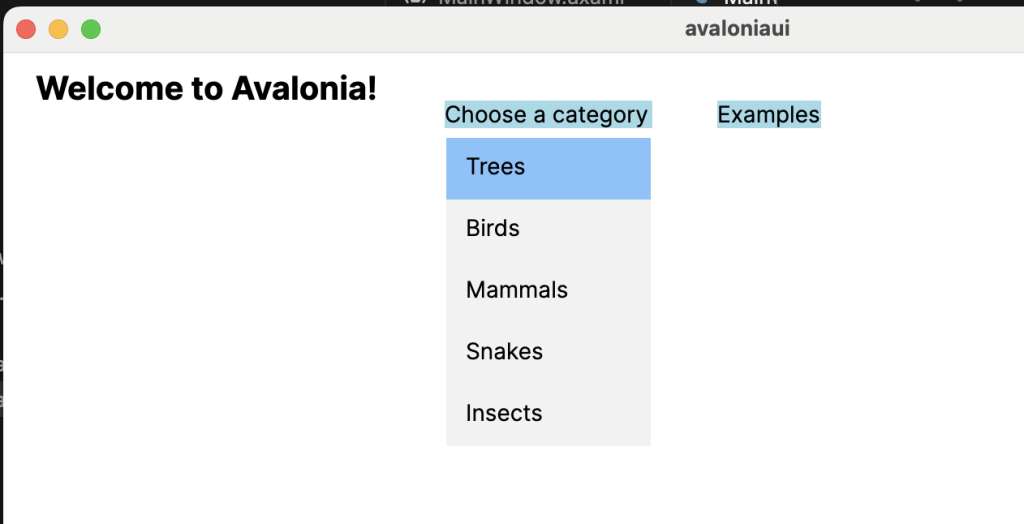
Now, all we need to do is to respond to the category change when a user hits a selection by filling in the right list with examples from our data. We just add one line to the event response method:
public void CategoryChanged(object source, SelectionChangedEventArgs args)
{
if (source is ListBox listBox)
{
Console.WriteLine($”Category changed to {listBox.SelectedItem}”);
resultlist.ItemsSource = catgeoryDict[(string)listBox.SelectedItem].ToList();
}
}
|
public void CategoryChanged(object source, SelectionChangedEventArgs args) { if (source is ListBox listBox) { Console.WriteLine($”Category changed to {listBox.SelectedItem}”); resultlist.ItemsSource = catgeoryDict[(string)listBox.SelectedItem].ToList(); } } |
As the SelectedItem is a string in our case, we can just use it as the index into the category dictionary to find the examples. Now we are done. We can select any of the categories and put the result in the next listbox:

Conclusion
That wasn’t too painful, but anything further would need us to use the ViewModel correctly. I tried using the DataGrid, a more powerful component to display data, and that was much more finicky.
For brevity, there is quite a bit left unexplained, even for this simple example — this feels like quite a bit of design baggage from elsewhere. Nevertheless, it successfully serves its purpose as an open source option for cross-platform UI work.
TRENDING STORIES
YOUTUBE.COM/THENEWSTACK
Tech moves fast, don’t miss an episode. Subscribe to our YouTube
channel to stream all our podcasts, interviews, demos, and more.
SUBSCRIBE
Group
Created with Sketch.

David has been a London-based professional software developer with Oracle Corp. and British Telecom, and a consultant helping teams work in a more agile fashion. He wrote a book on UI design and has been writing technical articles ever since….
Read more from David Eastman
SHARE THIS STORY
TRENDING STORIES
TNS DAILY NEWSLETTER
Receive a free roundup of the most recent TNS articles in your inbox each day.
Credit to the Original Article | Explore More of Their Work If You Found This Article Enjoyable.
https://thenewstack.io/avalonia-an-open-source-option-for-cross-platform-ui-work/